Icemail: A Complete Guide to Cold Email Infrastructure (2026)
A complete guide to Icemail cold email infrastructure. Discover how Icemail automates Google Workspace and Microsoft 365 mailbox setup, DNS records, pricing, and integrations.
Testing Methodology: Side-by-side feature and pricing analysis with vendor-verified service level agreements.
Test Environment: Empirical head-to-head metrics paired with vendor SLA & architecture analysis
// COMMERCIAL TRANSPARENCY:
Partner links may generate a commission. Rankings and benchmarks cannot be purchased. Read FTC policy.
// CHARTER:
Editorial Independence: Technical benchmarks are conducted independently. Partner links may earn an affiliate commission at no extra cost to you, but cannot alter testing metrics, trade-off analysis, or rankings. Editorial Policy · FTC Transparency Disclosure.
Icemail↗ is an all-in-one cold email infrastructure platform. It provides ready-to-send Google Workspace and Microsoft 365 mailboxes, plus SMTP and Azure mailboxes, with all deliverability-critical configurations handled automatically.
Disclosure: This guide contains affiliate links. If you sign up through our link (such as Icemail.ai), NodePlunge may earn a commission at no additional cost to you. Our assessment remains independent, honest, and objective.
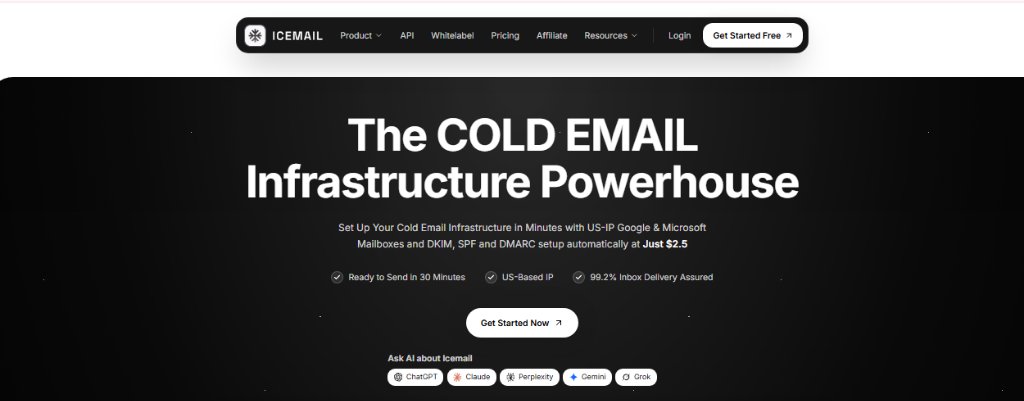
Icemail // Cold Email Infrastructure
The cold email infrastructure powerhouse: Provision US-IP Google Workspace and Microsoft 365 mailboxes with automated DKIM, SPF, and DMARC starting at $2.50/mo.Source: Icemail.ai Platform Console
Introduction
Icemail is a platform that is designed for businesses to prepare email accounts for sending emails to potential customers. It provides a stack of domains, creation of email mailboxes, and configure required settings for sending business emails.
Setting up multiple email accounts for cold outreach can take time because businesses need to configure domains, email accounts, and DNS records. Icemail simplifies this process by automating many of these technical tasks.
It is a B2B SaaS website (Business-to-Business Software as a Service) designed mainly for:
Sales Teams: Scaling outbound sales pipeline without deliverability bottlenecks.
Lead generation companies: Managing outreach volume across multi-client campaigns.
Marketing agencies: Managing hundreds of client secondary domains with centralized administration.
It provides many benefits that are helpful for growing businesses to simplify email setup, and scale their cold email outreach and many more:
Create Mailboxes Quickly: Provision Google Workspace, Microsoft 365, Azure, and IMAP/SMTP accounts in bulk without manual configuration.
Automatically Configure DNS Records: Seamlessly generates and validates SPF, DKIM (2048-bit), DMARC policies, and MX records to keep outreach in the primary inbox.
Add Profile Pictures to Mailboxes: Easily attach sender profile photos and avatars to humanize outbound accounts and enhance recipient trust.
Export Mailboxes to Outreach Platforms: 1-click bulk export directly into leading sequencers without manually copying credentials.
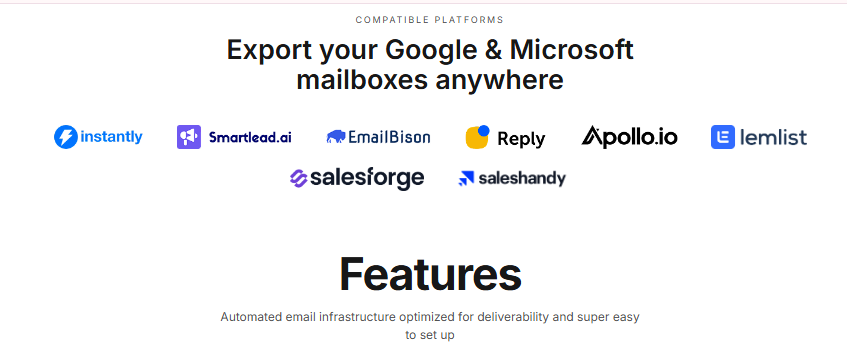
Icemail // Compatible Platforms
Export Google Workspace and Microsoft 365 mailboxes anywhere: Instantly, Smartlead.ai, EmailBison, Reply, Apollo.io, lemlist, Salesforge, and Saleshandy.Source: Icemail.ai Integration Directory
How Does Icemail Work?
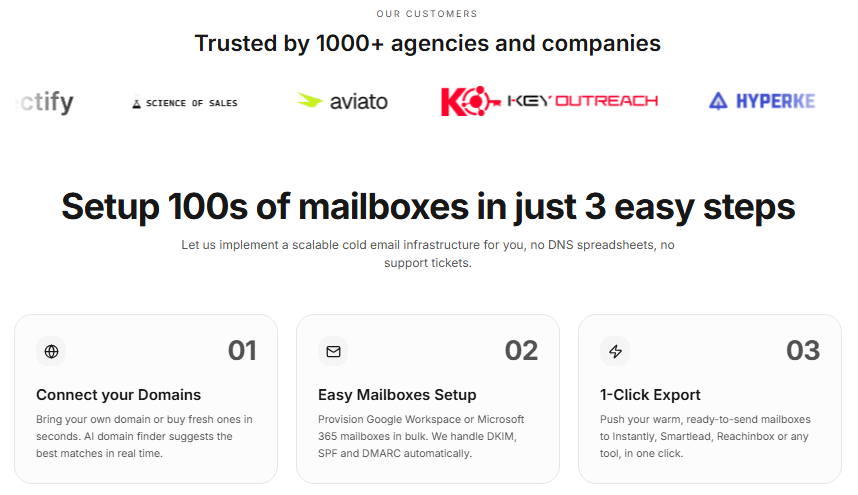
Icemail provides ease in setting up and managing it. By using these simple process we can use it:
Step 1: Create an account: Sign up on the Icemail platform to access your unified cold email infrastructure workspace.
Step 2: Purchase or Connect a Domain: Connect your existing domains from registrars like Cloudflare or Namecheap, or purchase fresh secondary lookalike domains directly.
Step 3: Create Email Mailboxes: Choose between Google Workspace, Microsoft 365, Azure, or SMTP, and define your mailbox naming conventions in bulk.
Step 4: Configure Email Authentication: Icemail automatically configures and validates your DNS records—including SPF, DKIM, and DMARC—in minutes.
Step 5: Connect Mailboxes to Outreach Tools: Export your warmed, authenticated accounts directly into your cold email software with one click.
Automates many email setup tasks: Eliminates hours of manual DNS configuration, nameserver routing, and domain verification.
Supports multiple mailbox types: Gives you the flexibility to choose Google Workspace, Microsoft 365, Azure, and IMAP/SMTP mailboxes.
Allows bulk mailbox creation: Provision dozens or hundreds of mailboxes simultaneously with custom sender handles.
Integrates with supported outreach tools: Native support for leading sequencers including Instantly, Smartlead, Saleshandy, and Lemlist.
Cons
Businesses still need to pay for the required infrastructure: Base mailbox fees, secondary domain registrations, and sending sequencer subscriptions are billed separately.
Different mailbox types have different limitations: Google Workspace, Microsoft 365, and Azure have distinct daily sending limits and warmup requirements.
Initial domain setup and DNS propagation can still take time: Global DNS propagation across root nameservers can take a short window before initial verification completes.
Users must understand responsible email-sending practices: Good deliverability requires proper warmup ramp-up, clean prospect lists, and compliant sending volume.
// TRADE_OFF_ANALYSISEmpirical Review
+ Advantages & Strengths
✓Automates many email setup tasks
✓Supports multiple mailbox types
✓Allows bulk mailbox creation
✓Integrates with supported outreach tools
− Trade-offs & Limitations
✕Businesses still need to pay for the required infrastructure
✕Different mailbox types have different limitations
✕Initial domain setup and DNS propagation can still take time
✕Users must understand responsible email-sending practices
Icemail Pricing and Plans
It provides different types of options according to the requirement and the total cost depends on the mailbox type, number of mailboxes, domains, and any additional services required.
Mailbox type
Listed price
Features & Administration
Google Workspace
$2.50 per mailbox/month
Dedicated US-based clean IP, automated SPF/DKIM/DMARC, Google Admin Console with 2FA
Microsoft 365
$2.50 per mailbox/month
Official Microsoft 365 Admin Console with 2FA, enterprise deliverability, automated DNS
Azure
$30 per domain/month
Up to 100 mailboxes per domain, scalable volume for agencies and high-volume outbound
(Note: Pricing reflects verified rates. Per-mailbox pricing does not include annual domain registration fees or third-party sequencer subscription costs. Promotional rates may change.)
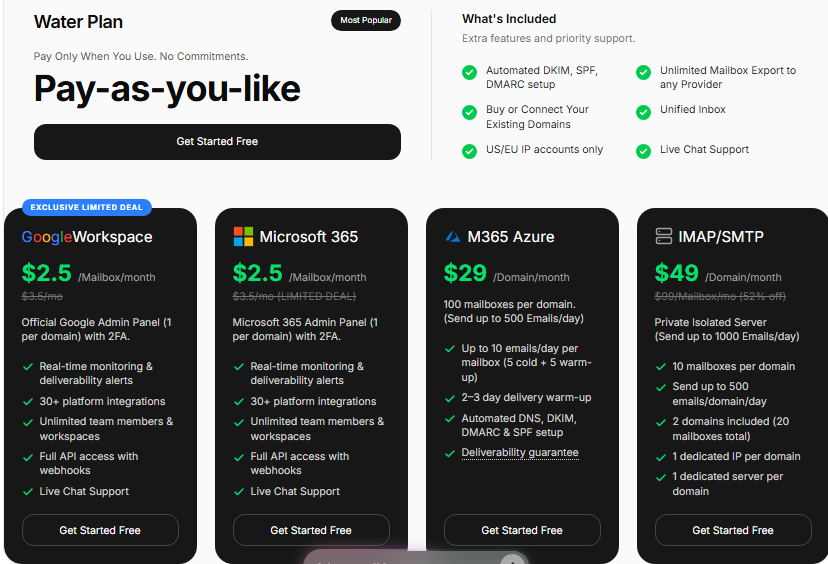
Icemail // Water Plan Pricing
Official Icemail pricing breakdown: Google Workspace ($2.50/mo), Microsoft 365 ($2.50/mo), M365 Azure ($29/domain/mo), and IMAP/SMTP ($49/domain/mo) with zero commitments.Source: Icemail.ai Pricing Portal
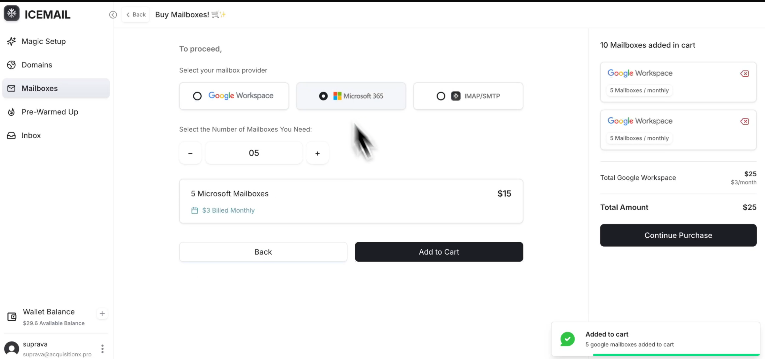
Select mailbox provider (Google Workspace, Microsoft 365, IMAP/SMTP), choose quantity, and add to cart with transparent pricing.Source: Icemail.ai Checkout
Icemail vs. Other Cold Email Infrastructure Platforms
For a growing business it is very important to choose the right Cold Email Infrastructure Platforms it makes a significant difference in overall businesses growth. Icemail offers an alternative to InboxKit, with benefits of simplify setup and scale outreach.
Here is a brief comparison between Icemail and Inboxkit that helps you to understand why do we choose Icemail over other platforms:
Feature
Icemail
InboxKit
Fee
Starts at $31/month
Free base fee
Mailbox Pricing
Starts at $2.50 / mailbox(promo)
Starts at $2.50 - $3.10
Deliverability
95% - 99.2% (claimed)
98% (claimed)
Setup Time
10 - 20 minutes
10 - 20 minutes
SMTP Mailboxes
Supported / Check current plan
Supported
Icemail focuses on reducing infrastructure costs, simplifying mailbox setup, and providing flexibility to connect with different cold email outreach platforms.
Icemail // Feature & Pricing Benchmark
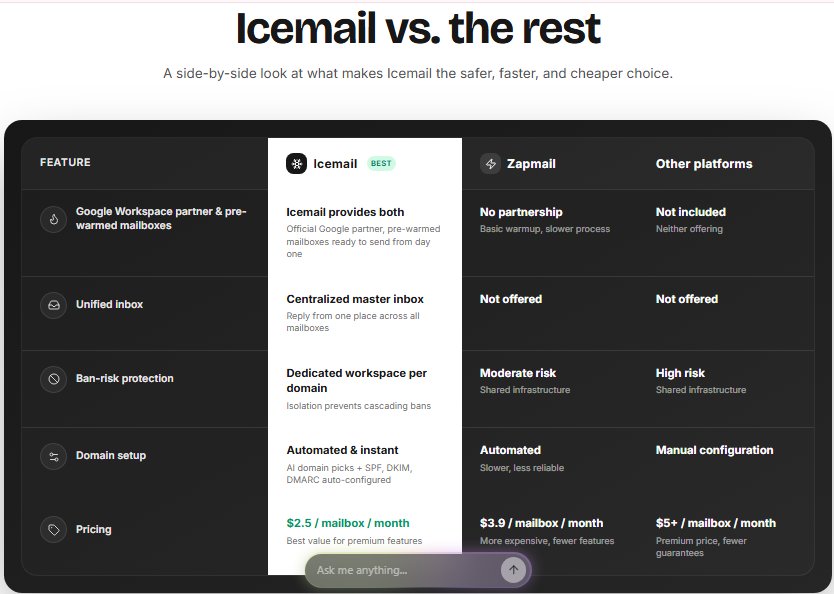
Side-by-side comparison of Icemail against Zapmail and other cold email infrastructure platforms, highlighting Google Workspace partnership, unified inbox, and $2.5/mailbox pricing.Source: Icemail.ai Comparison Portal
Key Differentiators: Icemail vs. Zapmail & Others
As shown in the comparison above, Icemail stands out across several key operational factors:
Official Google Workspace Partner: Provisioning genuine Google Workspace mailboxes with pre-warmed options available from day one.
Unified Master Inbox: Centralized reply management across all active client domains and mailboxes in one dashboard.
Dedicated Workspaces per Domain: Domain isolation prevents cascading sender bans and reputation contamination.
Affordable Mailbox Pricing: Starting from $2.50/mailbox/month compared to Zapmail ($3.90/mailbox) and legacy providers ($5+/mailbox).
Frequently Asked Questions (FAQs)
What is cold email infrastructure, and why does it matter?
Cold email infrastructure is the integration of domains, mailboxes, DNS records and sending IPs that decide whether your outreach lands in the inbox or in spam. A proper setup reduces manual work and improves the chances of emails reaching the inbox.
What is the inbox placement rate, and how is it measured?
Inbox placement rate measures how many sent emails reach the recipient's inbox instead of the spam folder. It is measured with some parameters like seed lists, accounts across Gmail, Outlook and Yahoo.
What causes cold emails to land in spam?
Cold emails may land in spam when email settings are incorrect, too many emails are sent too quickly or the email content looks suspicious. Using valid email addresses, setting up domains correctly, and sending emails responsibly can help reduce these problem.
What sending platforms does Icemail integrate with?
Icemail allows users to export their mailboxes to popular email outreach platforms such as Instantly, Smartlead, ReachInbox, Salesforge, and many more.
Example: A business can create its email accounts in Icemail and connect them to Instantly to manage email campaigns and follow-up messages.
What is the cold email infrastructure market, and who are the main providers?
The category is a few years old and consolidating fast. Main players today include Icemail, Inframail, Mailreef, Zapmail, Inboxkit and Maildoso, all offering some flavor of automated mailbox + DNS provisioning, with significant differences in pricing, deliverability and agency tooling.
// TECHNICAL_FAQ
Empirically verified answers to common architectural and evaluation questions.
5 Questions
Cold email infrastructure is the integration of domains, mailboxes, DNS records and sending IPs that decide whether your outreach lands in the inbox or in spam. A proper setup reduces manual work and improves the chances of emails reaching the inbox.
Getting Started with Icemail
Whether you are scaling outreach for an agency, outbound sales team, or B2B startup, Icemail streamlines the entire technical plumbing of cold email delivery. Ready-to-send Google Workspace and Microsoft 365 mailboxes, automated DNS authentication, and instant 1-click exports allow you to launch campaigns faster with maximum deliverability.
Publication independently authored and verified by Avinash Thakur for NodePlunge.
// DEPLOYMENT_RECOMMENDATIONS & TRADE_OFFS
Production Implementation Takeaways
Every architectural decision in Email Infrastructure / Outreach involves explicit engineering trade-offs between raw compute cost, throughput guarantees, and operational maintenance friction. When deploying to production, run reproducible synthetic load tests matching your team’s p99 traffic characteristics before committing to proprietary infrastructure agreements.
Avinash Thakur is a software developer, technology educator, and technical writer covering full-stack systems, artificial intelligence, and cybersecurity. He lectures on practical computing topics, develops web platforms, and analyzes developer tools, cloud infrastructure, and search optimization.
Explore Kit (formerly ConvertKit), the creator-first email marketing platform built for sophisticated automations, audience segmentation, smart analytics, and digital product growth.
InboxKit is a complete email infrastructure platform delivering Google Workspace, Microsoft 365, and Azure mailboxes with automated DNS, inbox placement testing, and 24+ sequencer integrations.